Balance
The follow functions return the Balance such as by the Parameter Client, Code, Date and Cost Center.
This Function returns the balance of the account or group based on a given Code.
Function call:
=TopalBaeBalance("1000") or =TopalBaeBalance("CellNo.")
=TopalBaeBalance("1000") or =TopalBaeBalance("CellNo.")
Example:

Figure 1: return balance of the account
Error Message:
An error will be displayed if given account does not exist in your Chart of Account.
An error will be displayed if given account does not exist in your Chart of Account.
This Function returns the balance of the account or group based on a given Client and Code.
Function call:
=TopalBaeBalanceByClient("Mon Bijou AG";"1000") or =TopalBaeBalanceByClient("Client";"CellNo.")
=TopalBaeBalanceByClient("Mon Bijou AG";"1000") or =TopalBaeBalanceByClient("Client";"CellNo.")
Example:

Figure 2: return balance of the account by client
Error Message:
An error will be displayed if given account does not exist in your Chart of Account.
An error will be displayed if given account does not exist in your Chart of Account.
This Function returns the balance of the account or group based on a given Code and Date.
Function call:
=TopalBaeBalanceByDate("1000";"01.04.2016") or =TopalBaeBalanceByDate("CellNo.";"01.04.2016")
=TopalBaeBalanceByDate("1000";"01.04.2016") or =TopalBaeBalanceByDate("CellNo.";"01.04.2016")
Example:
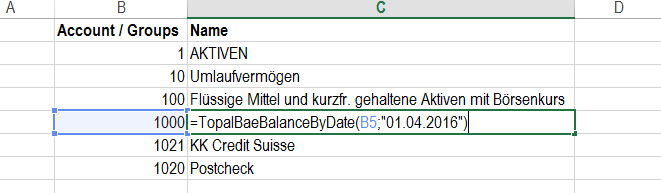
Figure 3: return balance of account by date
Error Message:
An error will be displayed if given account does not exist in your Chart of Account.
An error will be displayed if given account does not exist in your Chart of Account.
This Function returns the balance of the account or group based on a given Clientname, Code and Date.
Function call:
=TopalBaeBalanceByClientDate("Mon Bijou AG";"1000";"01.04.2016") or =TopalBaeBalanceByClientDate("Client";"CellNo.";"Date")
=TopalBaeBalanceByClientDate("Mon Bijou AG";"1000";"01.04.2016") or =TopalBaeBalanceByClientDate("Client";"CellNo.";"Date")
Example:

Figure 4: return balance of account by client and date
Error Message:
An error will be displayed if given account does not exist in your Chart of Account.
An error will be displayed if given account does not exist in your Chart of Account.
This Function returns the balance of the account or group based on a given Code, Cost Center and Date.
Function call:
=TopalBaeBalanceByDate("1000";"Bern";"01.04.2016") or =TopalBaeBalanceByDate("CellNo.";"Cost Center";"Date")
=TopalBaeBalanceByDate("1000";"Bern";"01.04.2016") or =TopalBaeBalanceByDate("CellNo.";"Cost Center";"Date")
Example:
Figure 5: return balance of account by cost center and date
Error Message:
An error will be displayed if given account does not exist in your Chart of Account.
An error will be displayed if given account does not exist in your Chart of Account.
This Function returns the balance of the account or group based on a given Clientname, Code, Cost Center and Date.
Function call:
=TopalBaeBalCcByClientDate("Mon Bijou AG";"1000";"Bern";"01.04.2016") or =TopalBaeBalCcByClientDate("Client";"CellNo.";"Cost Center";"Date")
=TopalBaeBalCcByClientDate("Mon Bijou AG";"1000";"Bern";"01.04.2016") or =TopalBaeBalCcByClientDate("Client";"CellNo.";"Cost Center";"Date")
Example:

Figure 6: return balance of account by client, cost center and date
Error Message:
An error will be displayed if given account does not exist in your Chart of Account.
An error will be displayed if given account does not exist in your Chart of Account.
This Function returns the balance of the account or group based on a given Code and Date range.
Function call:
=TopalBaeBalanceByDates("1000";"01.04.2016";"30.04.2016") or =TopalBaeBalanceByDates("CellNo.";"01.04.2016";"30.04.2016")
=TopalBaeBalanceByDates("1000";"01.04.2016";"30.04.2016") or =TopalBaeBalanceByDates("CellNo.";"01.04.2016";"30.04.2016")
Example:

Figure 7: return balance of account by daterange
Error Message:
An error will be displayed if given account does not exist in your Chart of Account.
An error will be displayed if given account does not exist in your Chart of Account.
This Function returns the balance of the account or group based on a given Clientname, Code and Date range.
Function call:
=TopalBaeBalanceByDates("Mon Bijou AG";"1000";"01.04.2016";"30.04.2016") or =TopalBaeBalanceByDates("Client";"CellNo.";"DateFrom";"DateUntil")
=TopalBaeBalanceByDates("Mon Bijou AG";"1000";"01.04.2016";"30.04.2016") or =TopalBaeBalanceByDates("Client";"CellNo.";"DateFrom";"DateUntil")
Example:

Figure 8: return balance of account by client and daterange
Error Message:
An error will be displayed if given account does not exist in your Chart of Account.
An error will be displayed if given account does not exist in your Chart of Account.
This Function returns the balance of the account or group based on a given Code, Cost Center and Date range.
Function call:
=TopalBaeBalCcByDates("1000";"Bern";"01.04.2016";"30.04.2016") or =TopalBaeBalCcByDates("CellNo.";"Cost Center";"DateFrom";"DateUntil")
=TopalBaeBalCcByDates("1000";"Bern";"01.04.2016";"30.04.2016") or =TopalBaeBalCcByDates("CellNo.";"Cost Center";"DateFrom";"DateUntil")
Example:
Figure 9: return balance of account by cost center and daterange
Error Message:
An error will be displayed if given account does not exist in your Chart of Account.
An error will be displayed if given account does not exist in your Chart of Account.
This Function returns the balance of the account or group based on a given Clientname, Code, Cost Center and Date range.
Function call:
=TopalBaeBalCcByDates("Mon Bijou AG";"1000";"Bern";"01.04.2016";"30.04.2016") or =TopalBaeBalCcByDates("Client";"CellNo.";"Cost Center";"DateFrom";"DateUntil")
=TopalBaeBalCcByDates("Mon Bijou AG";"1000";"Bern";"01.04.2016";"30.04.2016") or =TopalBaeBalCcByDates("Client";"CellNo.";"Cost Center";"DateFrom";"DateUntil")
Example:
Figure 10: return balance of account by client, cost center and daterange
Error Message:
An error will be displayed if given account does not exist in your Chart of Account.
An error will be displayed if given account does not exist in your Chart of Account.