Gets the previously or by date fiscal year and sets the fiscal year.
TopalGetPreviousYear("fiscalYear")
|
This Function gets the previous Fiscal Year based on the given Fiscal Year.
Function call:
=TopalGetPreviousYear("2016") or =TopalGetPreviousYear("FiscalYear")
Example:
Figure 1: return the previous Fiscal Year
Error Message:
An error will be displayed if given account does not exist in your Chart of Account.
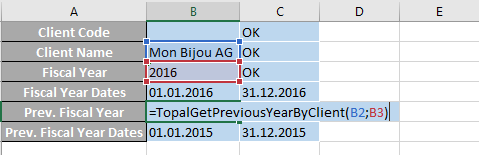
TopalGetPreviousYearByClient("Client";"FiscalYear")
|
This Function gets the previous Fiscal Year based on the given Client and Fiscal Year.
Function call:
=TopalGetPreviousYearByClient("Mon Bijou AG";"2016") or =TopalGetPreviousYearByClient("Client";"FiscalYear")
Example:
Figure 2: return the previous fiscal year by client
Error Message:
An error will be displayed if given account does not exist in your Chart of Account.
TopalGetFiscalYearDateFrom("fiscalYear")
|
This Function gets the date start of the Fiscal Year based on the given Fiscal Year.
Function call:
=TopalGetFiscalYearDateFrom("2016") or =TopalGetFiscalYearDateFrom("FiscalYear")
Example:
Figure 3: return the date start of the fiscal year
Error Message:
An error will be displayed if given account does not exist in your Chart of Account.
TopalGetFiscalYearDateFromByClient("Client";"FiscalYear")
|
This Function gets the date start of the Fiscal Year based on the given Client and Fiscal Year.
Function call:
=TopalGetFiscalYearDateFromByClient("Mon Bijou AG";"2016") or =TopalGetFiscalYearDateFromByClient("Client";"FiscalYear")
Example:
Figure 4: return the date start of the fiscal year by client
Error Message:
An error will be displayed if given account does not exist in your Chart of Account.
TopalGetFiscalYearDateUntil("fiscalYear")
|
This Function gets the date end of the Fiscal Year based on the given Fiscal Year.
Function call:
=TopalGetFiscalYearDateUntil("2016") or =TopalGetFiscalYearDateUntil("FiscalYear")
Example:
Figure 5: return the date end of the fiscal year
Error Message:
An error will be displayed if given account does not exist in your Chart of Account.
TopalGetFiscalYearDateUntilByClient("Client";"fiscalYear")
|
This Function gets the date end of the Fiscal Year based on the given Clientname and Fiscal Year.
Function call:
=TopalGetFiscalYearDateUntilByClient("Mon Bijou AG";"2016") or =TopalGetFiscalYearDateUntilByClient("Client";FiscalYear")
Example:
Figure 6: return the date end of the fiscal year by client
Error Message:
An error will be displayed if given account does not exist in your Chart of Account.
TopalSetGlobalFiscalYear("fiscalYear")
|
This Function sets the Fiscal Year based on the given Fiscal Year.
Function call:
=TopalSetGlobalFiscalYear("2016") or =TopalSetGlobalFiscalYear("FiscalYear")
Example:
Figure 7: sets the fiscal year
Error Message:
An error will be displayed if given account does not exist in your Chart of Account.
TopalSetGlobalFiscalYearByClient("Client";"FiscalYear")
|
This Function sets the Fiscal Year based on the given Client and Fiscal Year.
Function call:
=TopalSetGlobalFiscalYearByClient("Mon Bijou AG";"2016") or =TopalSetGlobalFiscalYearByClient("Client";"FiscalYear")
Example:
Figure 8: sets the fiscal year by client
Error Message:
An error will be displayed if given account does not exist in your Chart of Account.