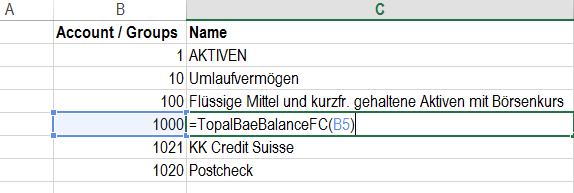
Gets the FC balance of Item.
TopalBaeBalanceFC("Code")
This Function returns the fc balance of the account or group based on a given Code.
Function call:
=TopalBaeBalanceFC("1000") or =TopalBaeBalanceFC("CellNo.")
Example:
Figure 1: return the fc balance of account
Error Message:
An error will be displayed if given account does not exist in your Chart of Account.
TopalBaeBalanceFCByClient("Client";"Code")
This Function returns the balance fc of the account or group based on a given Clientname and Code.
Function call:
=TopalBaeBalanceFCByClient("Mon Bijou AG";"1000") or =TopalBaeBalanceFCByClient("Client";"CellNo.")
Example:
Figure 2: return the fc balance of account by client
Error Message:
An error will be displayed if given account does not exist in your Chart of Account.
TopalBaeBalanceFCByDate("code";"date")
This Function returns the balance fc of the account or group based on a given Code and Date.
Function call:
=TopalBaeBalanceFCByDate("1000";"01.04.2016") or =TopalBaeBalanceFCByDate("CellNo.";"01.04.2016")
Example:
Figure 3: return the fc balance of account by date
Error Message:
An error will be displayed if given account does not exist in your Chart of Account.
TopalBaeBalanceFCByClientDate("Client";"Code";"Date")
This Function returns the balance fc of the account or group based on a given Client, Code and Date.
Function call:
=TopalBaeBalanceFCByClientDate("Mon Bijou AG";"1000";"01.04.2016") or =TopalBaeBalanceFCByClientDate("Client";"CellNo.";"Date")
Example:
Figure 4: return the fc balance of account by client, date
Error Message:
An error will be displayed if given account does not exist in your Chart of Account.
TopalBaeBalFcCcByDate("Code";"Cost Center";"Date") [WORKING PROCESS]
This Function returns the balance fc of the account or group based on a given Code, Cost Center and Date.
Function call:
=TopalBaeBalFcCcByDate("1000";"Bern";"01.04.2016") or =TopalBaeBalFcCcByDate("CellNo.";"Cost Center";"Date")
Example:
Figure 5: Account Name
Error Message:
An error will be displayed if given account does not exist in your Chart of Account.
TopalBaeBalFcCcByClientDate("Client";"Code";"Cost Center";"Date") [WORKING PROCESS]
This Function returns the balance fc of the account or group based on a given Code, Cost Center and Date.
Function call:
=TopalBaeBalFcCcByClientDate("Mon Bijou AG";"1000";"Bern";"01.04.2016") or =TopalBaeBalFcCcByClientDate("Client";"CellNo.";"Cost Center";"Date")
Example:
Figure 6: Account Name
Error Message:
An error will be displayed if given account does not exist in your Chart of Account.